外部記憶體語法
外部記憶體語法(.%)用來引用存在「變數」資源或外部記憶體裡的資料。當資料大到塞不進工作流程狀態(約超過 256 KB),或需要在多次執行之間共用同一份設定時,就會用到它。
先讀:.% 和 .$ 走同一個對話框,不必寫 JSON
本頁的 JSON 都是平台產生的內容,不需要手動輸入。實際操作是四步:把滑鼠移到要填的欄位上 → 打開標籤右側浮出的「JSONPath」開關 → 點變成唯讀的路徑框(或右側 鉛筆)開啟「編輯參考路徑」對話框 → 把「來源」從「狀態輸入」改成「變數」「外部記憶體」或「外部記憶體列表」,填 id 與 jsonpath,按「儲存」。
對話框的完整說明見任務通用設定 › 欄位的輸入方式切換。真的想看底層長相時,打開節點面板的「定義」開關對照即可;也可以按編輯器頂端的「程式碼」開左側的 ASL 面板(見編輯器介面導覽),但那是除錯用,不是必經之路。
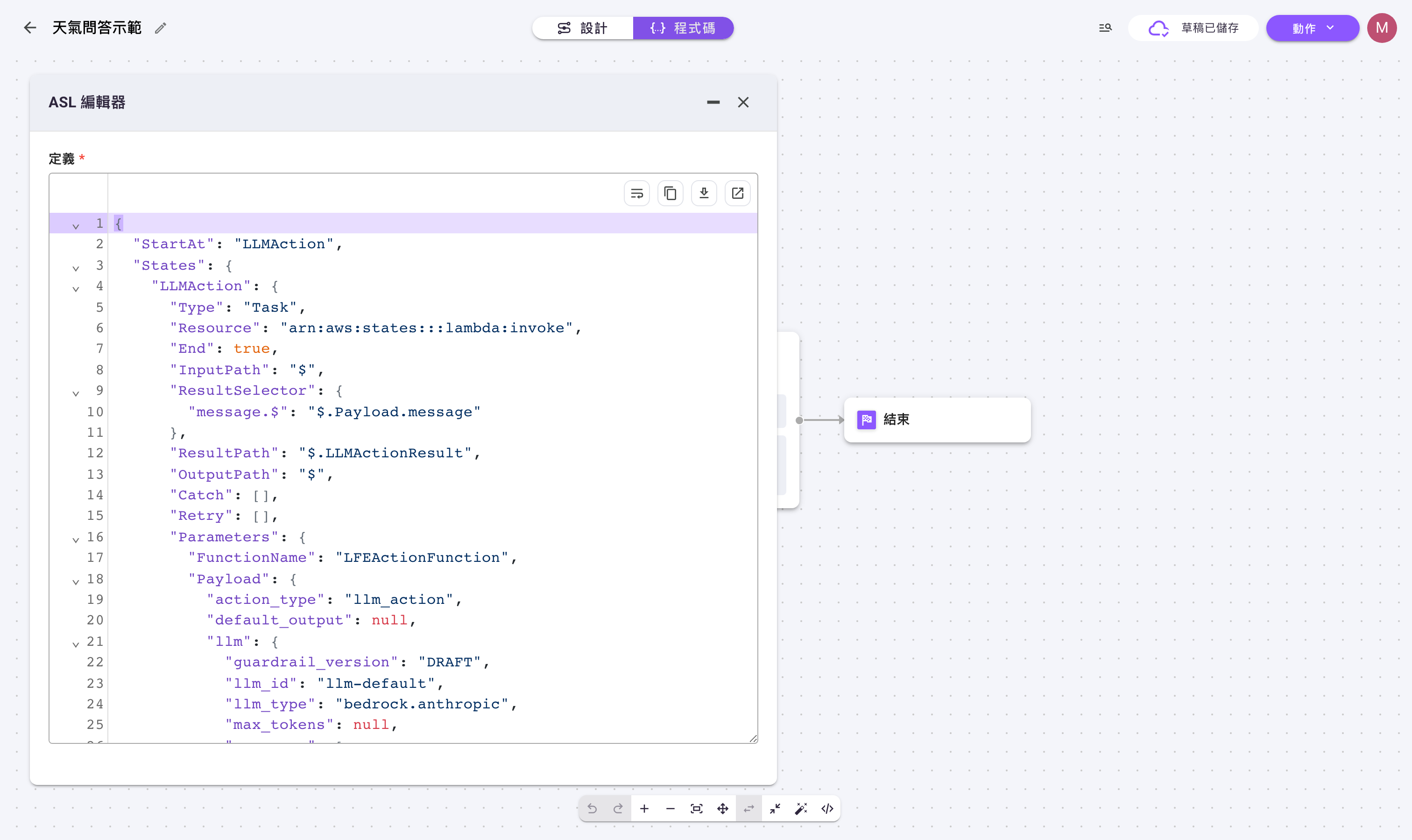
這頁分成兩半
- 存進去:把「輸出/輸入太大」的資料改存到外部記憶體,是一個開關(見下一節)。
- 讀回來:把存進去的資料再拿出來用,也就是本頁
.%這一套。同樣是畫面操作,走上面那個「編輯參考路徑」對話框;下面的 JSON 用來看懂結構、對照除錯。
畫面上做得到的部分:開關在哪一層
外部記憶體的開關分在兩個不同的地方,名稱也不同,搞錯層級是最常見的失敗原因:
| 要處理的資料 | 開關在哪裡 | 開關名稱 | 開啟後多出的選擇器 |
|---|---|---|---|
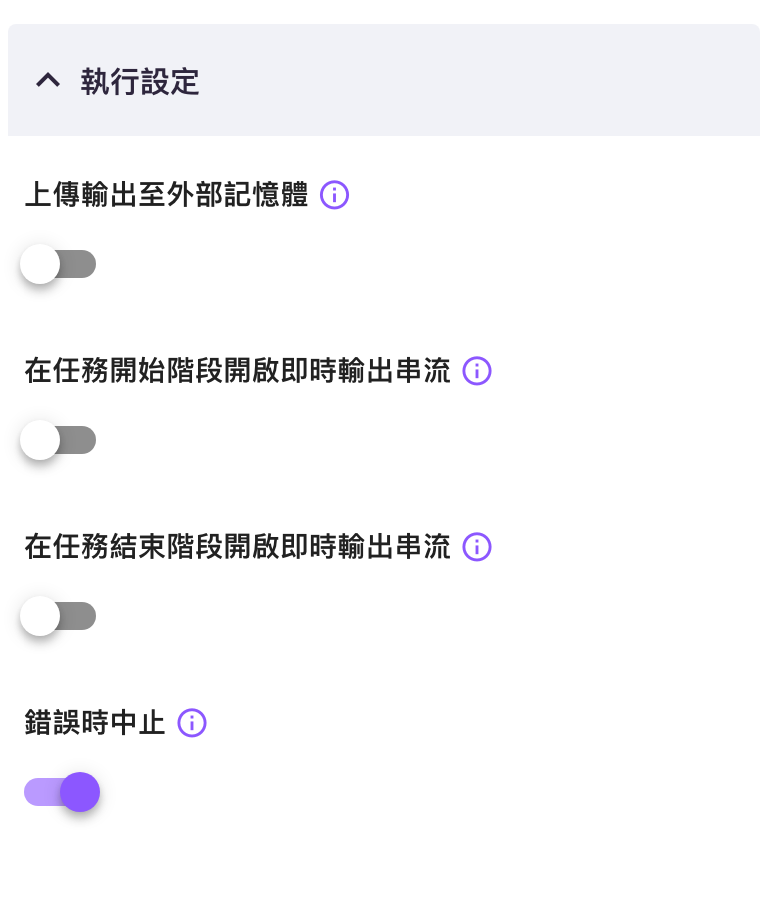
| 某一個任務自己的輸出太大 | 該任務節點面板「設定」分頁最下方的「執行設定」摺疊區 | 上傳輸出至外部記憶體 | 狀態記憶體輸出選擇器 |
| 整條流程一開始收到的輸入太大 | 執行畫面「新的執行」表單的「進階設定」,或編輯器裡的「開始」節點面板 | 上傳輸入至外部記憶體 | 狀態記憶體輸入選擇器 |
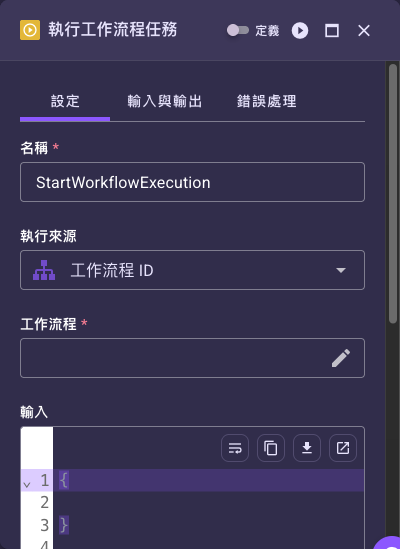
| 某個「執行工作流程」任務要傳給子流程的輸入太大 | 該任務節點面板「設定」分頁主區域(不在「執行設定」裡) | 上傳輸入至外部記憶體 | 狀態記憶體輸入選擇器 |
一般任務的「執行設定」裡沒有輸入面的選擇器
像大型語言模型這類一般任務,「執行設定」只有「上傳輸出至外部記憶體」、兩個即時輸出串流開關與「錯誤時中止」,沒有「狀態記憶體輸入選擇器」(上圖為證)。輸入面的選擇器只出現在「新的執行」表單的「進階設定」、「開始」節點面板,以及「執行工作流程」/「執行同步工作流程」這兩種任務的「設定」分頁主區域。逐步操作與截圖見外部記憶體。
以下為工程參考:.% 的寫法
語法格式
{
  "field.%": {
    "type": "variable",
    "id": "var-abc123",
    "jsonpath": "$.path.to.value"
  }
}
關鍵要求: 欄位名稱必須使用 .% 後綴,且物件必須包含 type、id(或 id.$)和 jsonpath 欄位。
範例裡的 var-abc123 是假的,真實 id 從哪來?
本頁範例用 var-abc123、var-config-id 這類佔位字串代表變數資源的 id;它們不是可以直接照抄的真值。要取得真實 id:到左側「資源」→「變數」清單,點進已建立的那筆變數資源,在它的詳細頁就能看到(並複製)它的 id。建立與管理變數的方式見 變數資源指南。
兩種引用類型
變數資源
「變數」資源用來存放不改工作流程定義也能更新的設定值。
{
  "config.%": {
    "type": "variable",
    "id": "var-abc123",
    "jsonpath": "$.settings"
  }
}
外部記憶體
當在任務的「執行設定」打開「上傳輸出至外部記憶體」開關時(做法見外部記憶體),這個任務的大型輸出就會被存進外部記憶體。
{
  "large_data.%": {
    "type": "external_memory",
    "id.$": "$.previous_action.external_memory_id",
    "jsonpath": "$"
  }
}
注意: 當 ID 來自前一個任務的輸出時,使用 id.$ 搭配 JSONPath。
何時使用外部記憶體語法
使用 .% 語法當:
- ✅ 資料對於工作流程狀態來說太大(>256 KB)
- ✅ 設定應在不更改工作流程定義的情況下更新
- ✅ 多個工作流程需要共享相同資料
- ✅ 資料需要在工作流程執行間持久化
使用 $. 語法當:
- ❌ 資料較小且特定於當前執行
- ❌ 資料隨著每次工作流程執行而改變
- ❌ 在相同執行內存取前一個任務輸出
常見場景的定義寫法
場景 1:整條流程的輸入很大
當工作流程一開始就收到大型輸入資料(文件、報告、大包 JSON):
- 在「新的執行」表單的「進階設定」(或「開始」節點面板)打開「上傳輸入至外部記憶體」
- 用「狀態記憶體輸入選擇器」把後段步驟仍要直接引用的小欄位留在狀態內
場景 2:某個任務的輸出很大
對於產生大量內容的任務(檢索結果、解析文件、大型 API 回應):
- 在該任務的「執行設定」打開「上傳輸出至外部記憶體」
- 用「狀態記憶體輸出選擇器」只把必要欄位留在狀態內
- 之後的任務用
.%語法讀回完整內容
場景 3:父流程帶大資料給子流程
用「執行工作流程」或「執行同步工作流程」任務時:
- 在該任務「設定」分頁的主區域打開「上傳輸入至外部記憶體」(這兩種任務的輸入面開關不在「執行設定」裡)
- 用同時出現的「狀態記憶體輸入選擇器」讓子流程只讀需要的那幾塊資料
- 這樣就不必在父子流程之間整包複製大型資料
故障排除
問題:下游任務收到空值或 null
可能原因:
- 選擇器裡的 JSONPath 與實際執行時的資料結構不符
- 外部記憶體的 id 沒有正確傳給後續任務
解決方法:
- 從執行日誌驗證任務輸出結構
- 檢查
id.$是否正確引用 external_memory_id 欄位 - 更新選擇器裡的 JSONPath,讓它符合實際的資料結構
問題:留在狀態內的輸出仍然太大
可能原因:
- 沒有打開「上傳輸出至外部記憶體」開關
- 「狀態記憶體輸出選擇器」列得太寬,把大型欄位也留在狀態內
解決方法:
- 到該任務「設定」分頁最下方的「執行設定」打開「上傳輸出至外部記憶體」
- 精簡「狀態記憶體輸出選擇器」,把大型欄位從對照裡刪掉
- 狀態內只留必要的少數欄位
問題:父流程與子流程的資料對不上
可能原因:
- 父工作流程傳遞完整物件,而子工作流程預期巢狀欄位
- 父子工作流程之間的 Selector 不一致
解決方法:
- 讓父流程與子流程的「狀態記憶體輸入/輸出選擇器」對得起來
- 驗證子工作流程的輸入 schema 預期
- 使用範例資料測試以驗證資料流
實用範例
範例 1:從變數資源載入設定
建立名為「api-config」的變數資源,內容為:
{
  "base_url": "https://api.example.com",
  "timeout": 30,
  "retry_count": 3
}
傳遞任務設定:
{
  "parameters": {
    "api_settings.%": {
      "type": "variable",
      "id": "var-api-config-id",
      "jsonpath": "$"
    }
  }
}
輸出:
{
  "api_settings": {
    "base_url": "https://api.example.com",
    "timeout": 30,
    "retry_count": 3
  }
}
範例 2:從外部記憶體讀回大型資料
打開「上傳輸出至外部記憶體」的大型語言模型任務,輸出長這樣:
{
  "action_type": "llm_action",
  "external_memory_id": "mem-xyz789",
  "message": "Summary of document"
}
傳遞資料任務讀回完整內容:
{
  "parameters": {
    "full_context.%": {
      "type": "external_memory",
      "id.$": "$.LLMActionResult.external_memory_id",
      "jsonpath": "$"
    }
  }
}
id.$ 要指到那個任務真正的 ResultPath
上面寫 $.LLMActionResult.external_memory_id,是因為名為 LLMAction 的任務其輸出預設存在 $.LLMActionResult。任務名稱不同、或建立後改過名,這個路徑就不一樣——請到該任務「輸入與輸出」分頁看 ResultPath 欄位的實際值再填,見 Path Parameters。
範例 3:從變數資源只取其中一段
變數內容:
{
  "database": {
    "host": "db.example.com",
    "port": 5432,
    "name": "production"
  },
  "api_keys": {
    "service_a": "key-123",
    "service_b": "key-456"
  }
}
只提取資料庫設定:
{
  "db_config.%": {
    "type": "variable",
    "id": "var-config-id",
    "jsonpath": "$.database"
  }
}
輸出:
{
  "db_config": {
    "host": "db.example.com",
    "port": 5432,
    "name": "production"
  }
}
不要把 API 金鑰、密碼放進變數資源
上面的 api_keys 只是用來示範「變數內容可以有多段、jsonpath 只取其中一段」。真正的金鑰與密碼請放在對應的資源憑證欄位(例如連結器、LLM 資源),不要寫進變數資源——變數的內容會出現在工作流程定義與執行紀錄裡。
了解 jsonpath 欄位
jsonpath 欄位用 JSONPath 指出「要從變數或外部記憶體的內容裡,取哪一部分出來」。
常見模式:
| JSONPath | 提取內容 |
|---|---|
$ | 整個內容 |
$.field | 單一欄位 |
$.nested.field | 巢狀欄位 |
$.array[0] | 第一個陣列元素 |
處理任務的外部記憶體
當任務打開「上傳輸出至外部記憶體」時,它的輸出會被存進外部記憶體:
任務輸出:
{
  "action_type": "llm_action",
  "external_memory_id": "mem-abc123",
  "message": "Summary"
}
external_memory_id 儲存在任務的 ResultPath(例如 $.LLMActionResult.external_memory_id)。
存取完整內容:
{
  "full_response.%": {
    "type": "external_memory",
    "id.$": "$.LLMActionResult.external_memory_id",
    "jsonpath": "$"
  }
}
→ 了解更多關於 Path Parameter
結合 JSONPath 語法
可在同一個任務中同時使用 .% 和 .$:
{
  "config.%": {
    "type": "variable",
    "id": "var-settings",
    "jsonpath": "$"
  },
  "user_input.$": "$.question",
  "previous_result.$": "$.LLMActionResult.message"
}
此任務接收:
- 來自變數資源的持久性設定
- 來自工作流程狀態的使用者輸入
- 來自工作流程狀態的前一個任務輸出
最佳實踐
對設定使用變數資源:
- API 端點和憑證
- 模型參數和設定
- Template 和 Prompt
- 功能標記和開關
大型資料放外部記憶體:
- 長文件和轉錄稿
- 大型 API 回應
- Embedding 和向量
- 搜尋結果和資料集
記錄相依性:
- 在工作流程文件中列出所需的變數資源
- 註記哪些任務用到外部記憶體
- 包含預期資料結構的範例
自己管好變數資源的版本:
- 變數資源沒有「版本」頁籤(工作流程與 Agent 才有),改了就是直接覆蓋、看不到上一版,所以改之前先把舊值另存一份。
- 在正式環境套用前,先用改過的變數把工作流程跑一次。
- 開發/測試/正式環境建議各用一個變數資源,不要共用同一個。
常見錯誤
❌ 遺漏 .% 後綴
{
  "config": {  // 錯誤!
    "type": "variable",
    "id": "var-abc123",
    "jsonpath": "$"
  }
}
✅ 外部記憶體語法一律使用 .%
{
  "config.%": {  // 正確
    "type": "variable",
    "id": "var-abc123",
    "jsonpath": "$"
  }
}
❌ 對動態值使用靜態 id
{
  "data.%": {
    "type": "external_memory",
    "id": "$.Action.external_memory_id",  // 錯誤!應該是 id.$
    "jsonpath": "$"
  }
}
✅ 對 JSONPath 引用使用 id.$
{
  "data.%": {
    "type": "external_memory",
    "id.$": "$.Action.external_memory_id",  // 正確
    "jsonpath": "$"
  }
}
❌ 遺漏 jsonpath 欄位
{
  "config.%": {
    "type": "variable",
    "id": "var-abc123"  // 錯誤!遺漏 jsonpath
  }
}
✅ 一律包含 jsonpath
{
  "config.%": {
    "type": "variable",
    "id": "var-abc123",
    "jsonpath": "$"  // 正確
  }
}
大小限制
工作流程狀態(使用 $.):
- 每次執行最多 256 KB
- 包含所有任務輸出和工作流程變數
- 超過限制會導致執行失敗
外部記憶體(使用 .%):
- 無實際大小限制
- 適合文件、資料集和大型回應
- 由平台自動管理
相關主題
- JSONPath 語法 - 用於存取工作流程執行資料
- Path Parameters - 了解外部記憶體 id 掛在哪個 ResultPath
- 變數資源指南 - 建立和管理變數